




Filroden's FoundryVTT Modules

All modules respect your chosen UI theme and offer two colour options:

Visage

Latest Version Foundry Version License System Agnostic RTL Support Download Count Download Count Last Commit Issues

Welcome to Visage

Visage is the ultimate non-destructive token appearance module with an optional automation engine. It gives your tokens an "infinite wardrobe," allowing GMs and players to instantly transform characters with "Identities" and stackable "Overlays." By treating token art as a dynamic, persistent narrative tool, Visage brings your game's evolving story directly onto the canvas.

Please install the correct version of the module:

  • v4.x is compatible with v13 of FoundryVTT: This version is only being updated for bug fixes and will not contain features added to v5.
  • v5.x is compatible with v14 of FoundryVTT.
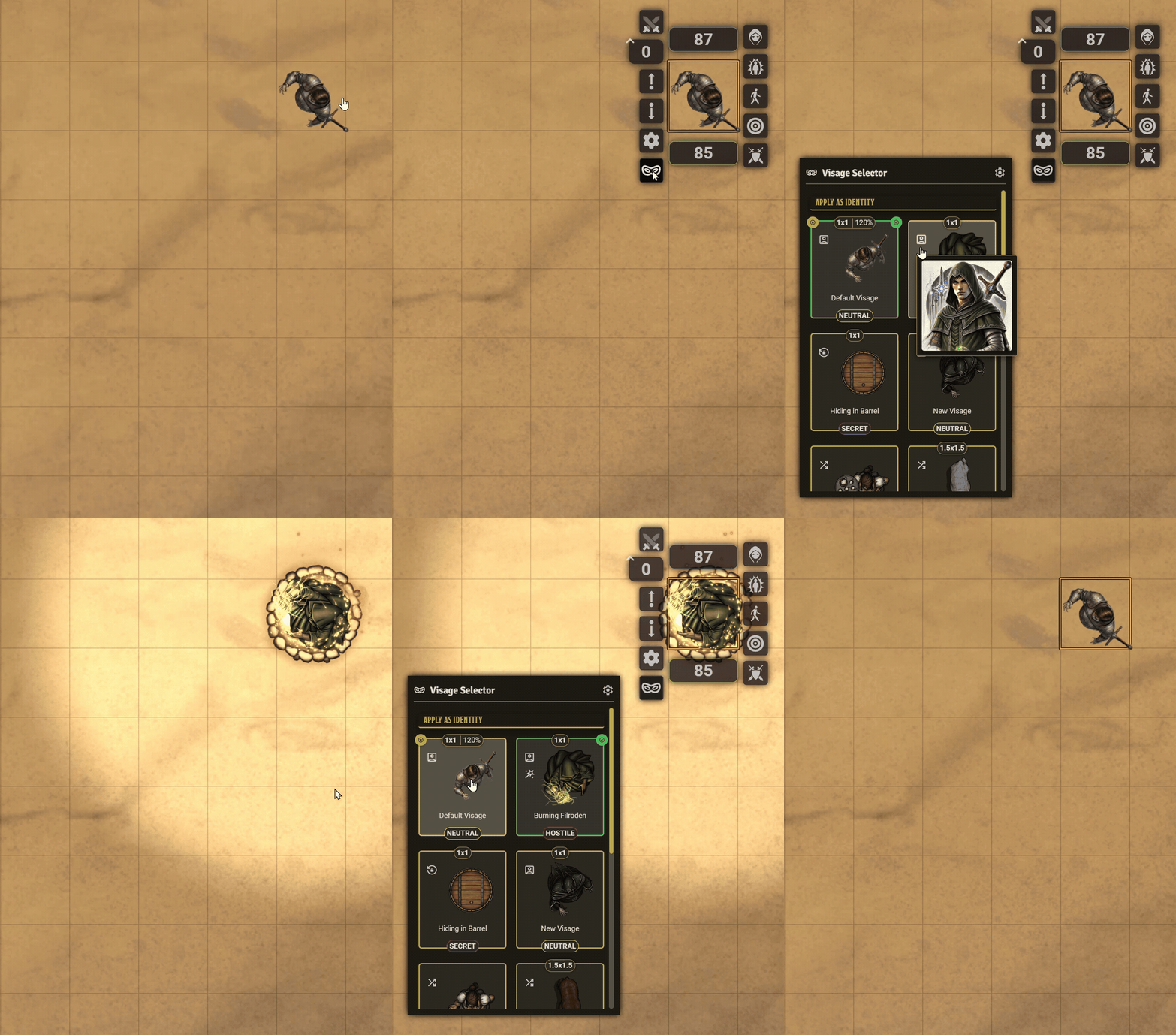
Visage

The Brass Tacks

In mechanical terms, Visage is a robust token property manager. Instead of manually opening the Token Configuration window during a game to change a token's image, size, disposition, dynamic ring, or light source, you save those settings into a package called a "Visage". And with the Sequencer module installed, you can also add visual and audio effects to your Visages.

You can then apply, stack, and remove these property overrides instantly via a slick UI or automatically via the built-in background Watcher. Because Visage caches the token's original database values, you can layer incredibly complex combinations of visual changes and Sequencer effects, knowing you can safely revert to the base token with a single click.

The Core Philosophy: Non-Destructive Layering

Visage works by taking a "snapshot" of your token's true base form. You can then apply Visages on top of it in two ways:

  • Identities: Replaces the core token completely. Perfect for Wild Shape, Polymorph, disguises, illusions or alternate outfits or poses.
  • Overlays: Stacks effects on top of the current token. Perfect for adding a sneak effect, status conditions, magical auras, or flying animations.

Because Visage is non-destructive, you can stack as many overlays as you want. When the spell ends or the disguise is dropped, simply click "Revert," and your token instantly returns to its original state.

Why use Visage? (The Infinite Wardrobe)

While other modules focus on transient animations (a sword swinging or a fireball flying), Visage focuses on persistent visual states. If you have the token art, Visage gives you the power to automate the narrative:

  • Costumes, Disguises and Illusions: Your Rogue doesn't just have one token. They have their standard gear, a stolen city guard uniform for infiltration, and a noble's outfit for the royal gala.
  • Poses & Stances: A boss monster starts as a "dormant" stone statue. When combat begins, they swap to a "combat-ready" pose with weapons drawn. When their HP drops below 50%, they instantly transform into a bloodied feral form.
  • Health & Conditions: Tokens dynamically reflect the brutality of combat. Apply battered, bruised, or bloody textures as a character takes damage, or add a sickly green hue when poisoned.
  • Lycanthropy & Shapeshifting: Druids can seamlessly shift between animal forms, completely changing their token image and size on the canvas while keeping their character sheet intact.

Key Features

  • The Automation Engine: Stop manually applying effects! Configure Visage to listen in the background and automatically apply visuals when conditions are met. Trigger Visages based on:
    • Attributes: e.g., Apply a bloody portrait when HP drops below 50%. Built with a searchable Attribute Picker that works with any game system.
    • Status Effects: e.g., Apply a glowing forcefield when the "Mage Armour" effect is present.
    • Game Events: React to Scene Darkness, Global Illumination, elevation changes, Region entry/exit, Combat states or even the token being targeted.
  • Integrated Media Pipeline: Visage seamlessly hooks into the Sequencer and Token Magic FX modules. Bind images, particle animations, looping sound effects, and WebGL shaders to your Visages with pinpoint cardinal alignment, offsets, and colour tinting. When the Visage is removed, the audio, visuals, and filters clean themselves up automatically.
  • Dynamic Token Ring Support: Fully supports Foundry's Dynamic Token Rings. Override subject textures, background colours, and toggle ring effects (Pulse, Wave, Invisibility) on the fly.
  • Global & Local Libraries: GMs can build a "Global Library" of universal effects to use across the world. Set some of these Visages to "public" and they become visible for players to use. Players have a "Local Library" tied to their specific character sheet for their personal transformations.
  • Quick Visages: Define a default image folder in your game settings to unlock the Quick Visage feature. The Selector HUD will automatically display any images from that folder (and its sub-folders) that match the token's name, allowing you to create a new Identity from a selected image and apply it immediately.

The Interface

Visage was built with User Experience in mind, offering three distinct tools:

  1. The Visage Library: The central hub for browsing, filtering, and organising Visages. GMs manage the world's "Global Library," while players manage their personal "Local Library."
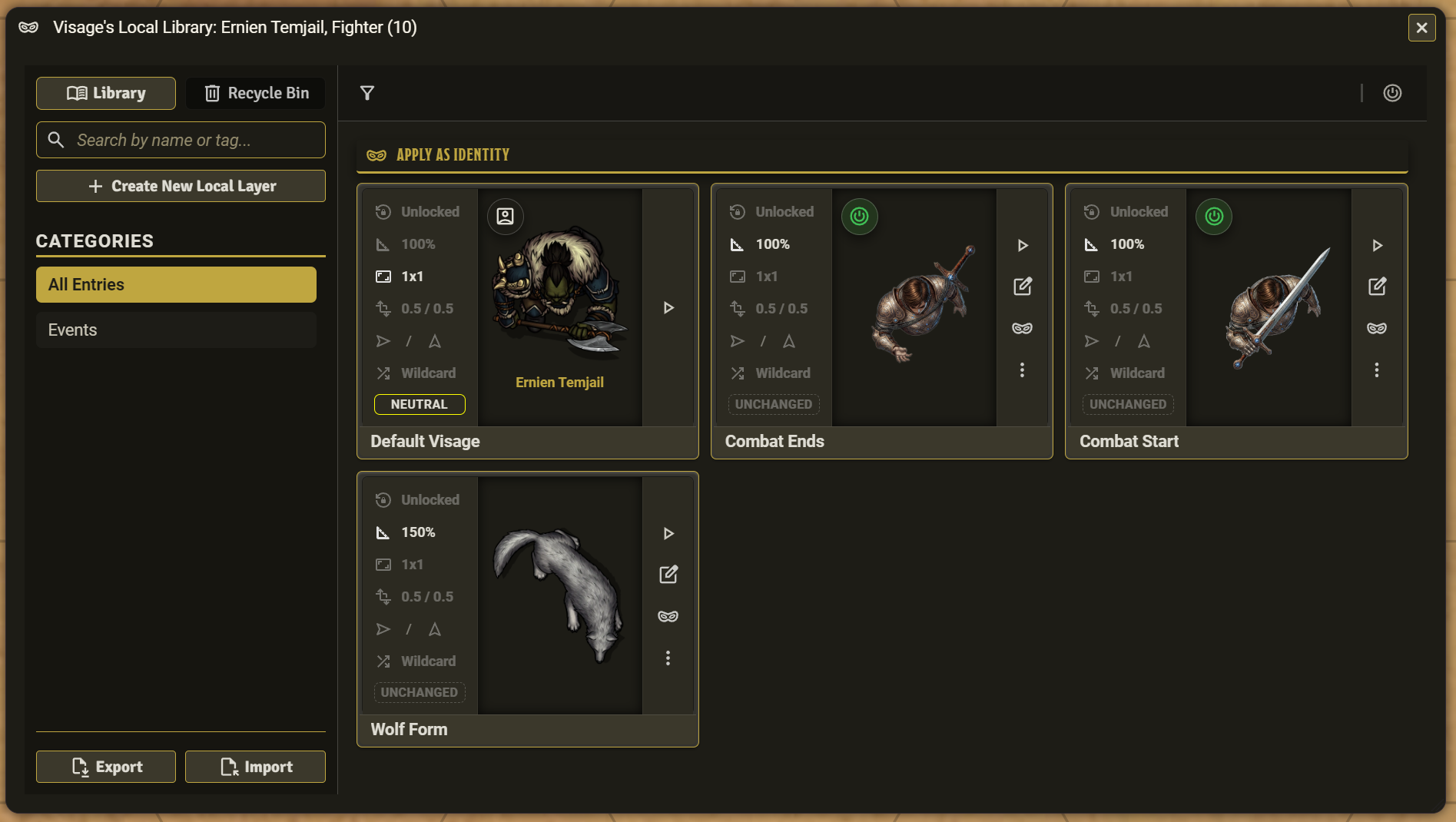
    Visage Local Library

  2. The Visage Editor: A powerful workstation to build Visages. It features a live preview stage so you can see your token's appearance and effects before you ever save or apply them.
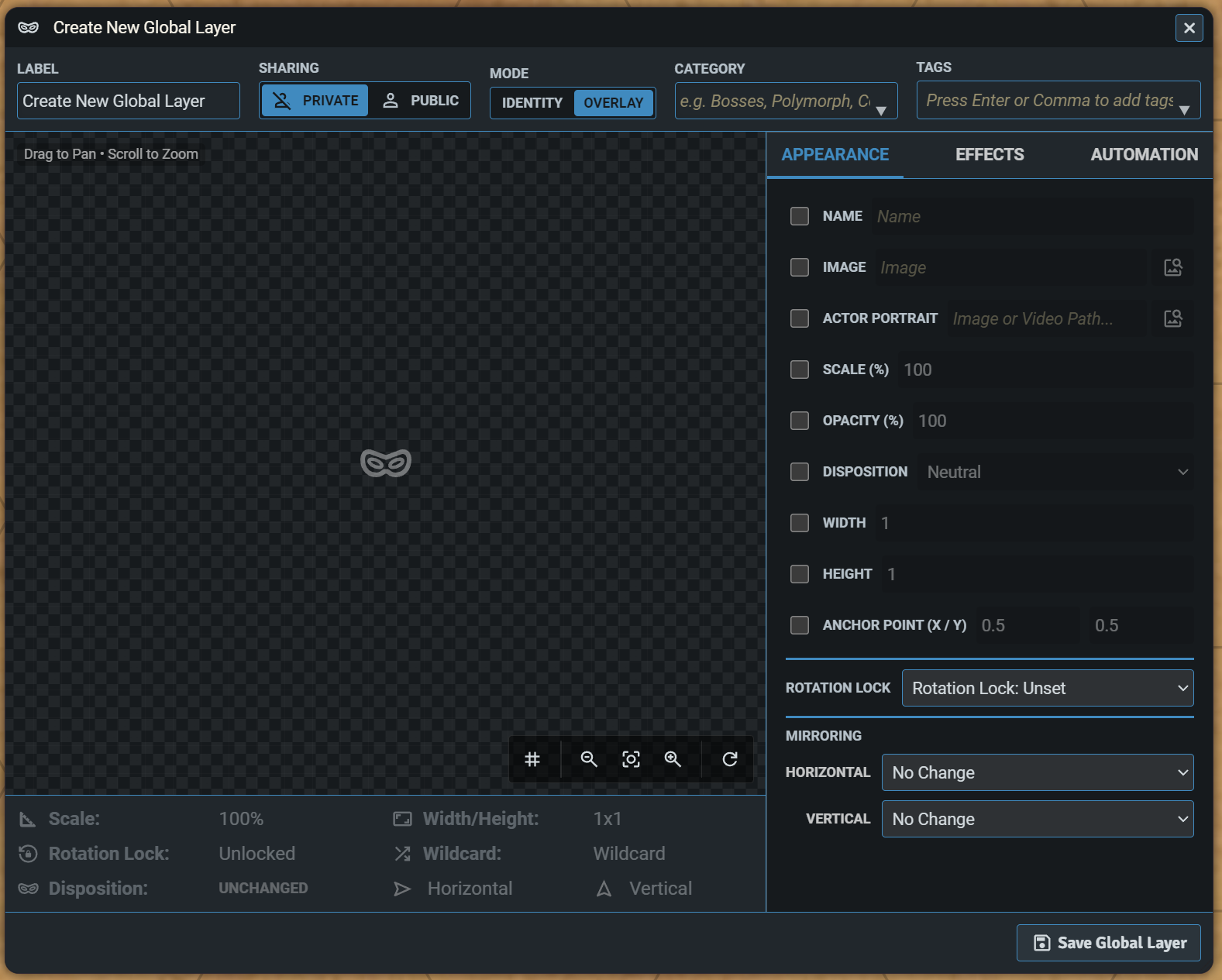
    Visage Global Editor

  3. The Selector HUD: A transient quick-menu that appears next to a token on the canvas. It allows players to quickly swap their active Visages, toggle visibility, reorder their active stack via drag-and-drop and create Quick Visages. The HUD includes a Pin toggle, allowing you to switch it from a floating panel to a standard, resizable window.
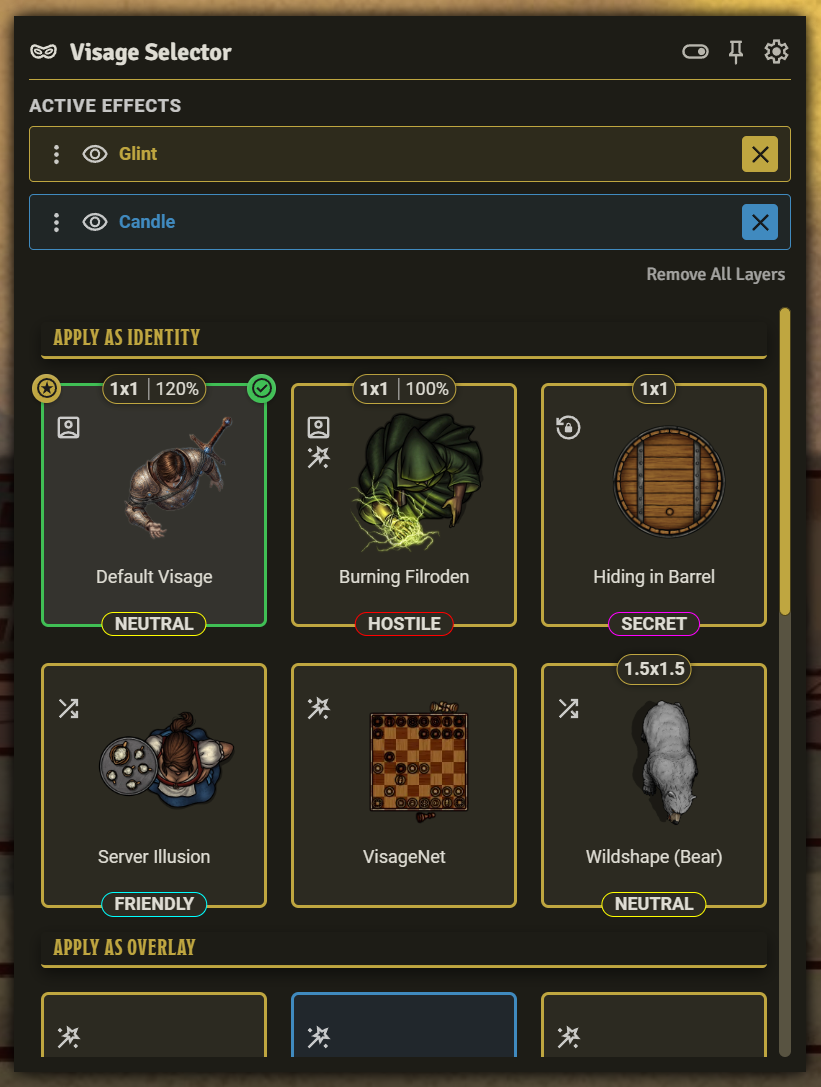
    Visage Selector HUD

Compatibility and Interaction with Other Modules

Visage is built with a "Dynamic Pass-Through" architecture, meaning it plays nicely with other modules that alter the same appearance properties of the token as Visage (e.g., size, scale, or lighting).

However, Visage acts as the ultimate visual authority for the properties it controls. If a conflict occurs, active Visages always win.

  • If an active Visage controls a property: (e.g., a "Giant" mask changes the token size to 3). If another module tries to shrink the token, the token will visually remain at width 3. The new size is safely saved in the background, but the Visage mask takes visual priority. When the Visage is removed, the token will correctly reveal its new, shrunken size.

  • If an active Visage ignores a property: (e.g., a "Ghost" mask that only changes opacity). If another module changes the token's size, Visage will let that size change pass through to the canvas while keeping the token transparent.

If a token's appearance does not update the way you would expect when a spell or macro is used, check if an active Visage is suppressing the change. Simply remove or toggle the visibility of the Visage to reveal the token's true base state.

Documentation and How-To Guides

Visage is a powerful tool with a lot of depth. For full tutorials, macro API documentation, and setup guides, please visit the Visage Wiki.

Troubleshooting and Bug Reports

If you encounter an issue, please use the Export Diagnostic Log button located in the Visage module settings. This will download a JSON file containing your environment details and token state, which you can attach to your bug report to help me fix it faster.

To get the absolute most out of Visage, I highly recommend installing the following modules:

  • Sequencer: Required if you wish to attach visual or audio effects to a Visage.
  • Token Magic FX: Allows you to attach advanced WebGL filters and shader presets to your Visages.
  • JB2A - Jules & Ben's Animated Assets: Provides a massive library of visual assets pre-registered into the Sequencer Database.
  • PSFX - Peri's Sound Effects: The audio equivalent to JB2A. Amazing sound effects perfectly formatted for VTT use.
  • FA Nexus: An in-game asset browser for Forgotten Adventures' extensive top-down token library.

Translations

Currently, this module officially supports English and French.

I rely on community contributions to support other languages. If you are a native speaker and would like to translate the module or verify an existing draft, I would love your help. You can find baseline language files for many languages in the main branch in the languages folder. Once a language is fully verified by a native speaker, I will include it in the next official release.

Licence

Software and associated documentation files in this repository are covered by an MIT Licence.

Changelog
Version 5.6.0

IMPROVEMENTS
- Improved compatibility with third-party modules that change token size, lighting, or appearance. Visage now dynamically adapts to external changes (such as a token being scaled up or polymorphed) without fighting the updates or causing visual flickering.
- Workflow Note: Visage retains visual authority. If another module alters a token (like a polymorph spell) while a Visage is active, the Visage will visually suppress the changes if they conflict. The changes are safely preserved in the background and will reveal themselves seamlessly once the Visage is removed or its visibility toggled off.

UNDER THE HOOD
- Refactored the state-authority architecture to a Dynamic Pass-Through model. Visage now intercepts token appearance property changes via the preUpdateToken hook, computing visual stacks synchronously to prevent database race conditions and improve performance.

Version 5.5.2

BUG FIXES
- Fixed an issue where automated Visages would continuously reapply themselves, causing a token's appearance to flicker when moved or interacted with.

Version 5.5.1

BUG FIXES
- Light settings on default token snapshots: Fixed an issue where base token snapshots were unintentionally stripping out native Foundry light properties not explicitly used by Visage, which could cause a token's default lighting to stop working. Because we cannot safely automate a migration without risking the overwrite of intentional user lighting setups, two new tools have been added to the Visage game settings menu. GMs can now manually use "Sanitize Selected" or "Sanitize World" to repair broken tokens by resetting their light schemas to Foundry defaults. These settings should only be used if you are experiencing problems with token lighting after using the Visage module.
- Fixed an issue in the PF2e system where Visage would incorrectly revert a token's autoscale property to true when returning to the base token scale. Visage now correctly restores the property to its original state, respecting tokens where autoscale was manually set to false.
- Fixed an issue where Visage would incorrectly capture automated token changes (such as the Rideable module altering a token's scale) as manual edits, causing the underlying token to become stuck at the wrong size or scale.
- Resolved a visual bug where active Sequencer effects would fail to realign themselves if a token's physical dimensions changed while a Visage was active.

UNDER THE HOOD
- Increased the Visage Automation debounce timer from 50ms to 250ms to prevent network race conditions with third-party modules when using Foundry on cloud-hosted services.
- Moved and refactored Visage payload generators from the data schema to the data controller to prevent legacy scale data from polluting database updates.
- Implemented strict property ownership logic to protect the base token state from being accidentally overwritten by external module updates. To maintain Visage's non-destructive behaviour, its saved default state can only be changed manually by the user through the core Foundry token configuration window.

Version 5.5.0

FEATURES
- Dylan's Animated Tokens (DAT) Integration: You can now configure DAT sprite sheets directly within the Visage Editor. When the DAT module is active, a dedicated settings group appears to manage your sprite properties. Visage now bypasses DAT when applying standard static tokens, ensuring both modules run together without conflict.

BUG FIXES
- Resolved an issue where applying multiple Visages in rapid succession could cause some changes to be lost. Applications are now strictly queued to process in the correct order. If a Visage uses a negative delay for a pre-effect animation, subsequent applications will wait in the queue until that sequence completes.
- Fixed an issue where third-party updates to a token's scale or offset values failed to pass through to Sequencer, which caused attached visual effects to become misaligned.

UNDER THE HOOD
- Restructured how Visage passes texture object updates to the Foundry database. By flattening the data keys, Visage now bypasses merging conflicts caused by other modules, resolving instances where token scale was not correctly applied or reverted.

Version 5.4.0

FEATURES
- Token Transitions: You can set whether applying a Visage uses the standard Foundry token transition animation or not within the Appearance tab of the Editor.
- Advanced Sequencer Settings: Added additional Sequencer effects which can be applied to visual effects. The new effects are included in an "Advanced Sequencer Settings" section inside the Visual Effect inspector tab. This section will change its title to green if any effects are changed from their defaults. The effects are FadeIn (duration and easing curves), ScaleIn (multiplier and easing curves), and rendering rules Mask To Token and Constrained By Walls.

Version 5.3.0

FEATURES
- Visual Effect Positioning: Anchor visual effects to either the token's image or its logical grid position (default is the token's image). You can apply offsets from the anchor using token units, where a value of 1 represents an offset of 100% of the token's width.
- Visual Effect Rotation Binding: Toggle whether an effect rotates alongside the token (default is true).
- Visual Effect Tinting: Apply custom colour tints directly to visual effects.

BUG FIXES
- Fixed an issue where wildcard filepath resolution failed when hosting via The Forge.
- Fixed an issue where token anchor points would incorrectly reset to centre (0.5, 0.5) when applying a Visage that had no explicit anchor values set.
- Fixed an issue where the Selector HUD would unexpectedly close when applying a Visage while in unpinned window mode.

UNDER THE HOOD
- Added a v5.3 database migration to automatically clear legacy default anchor values (0.5, 0.5), making sure Visages correctly inherit underlying positional shifts.

Version 5.2.0

IMPROVEMENTS
- You can now create and manage audio effects in the Editor without the Sequencer module enabled, provided you use direct file paths instead of database keys.
- New audio and visual effects are now created with looping disabled by default.
- Automated Local Visages can now be toggled on/off inside the Selector HUD by the player by clicking its icon.
- Editing an automated Visage while it is active on a token will now immediately update its visual effects when saved, removing the need to re-apply it by manually toggling the automation off and on.

BUG FIXES
- Removed default values for dynamic ring and background colours to prevent it being darkened. This will not change existing Visages. You can manually delete the default values and leave the dyanamic ring color and background inputs empty in the Visage Editor.
- The Editor file picker now correctly filters for audio files when configuring an audio effect.
- Fixed scale not showing as enabled when creating a new local Visage.
- Automated Visages now trigger immediately when the scene's weather changes, rather than waiting for token movement.
- Quick Visages will now ignore rotation and mirror properties on the base token unless they were actively enabled.

UNDER THE HOOD
- Visage Data Schema: Moved the core data architecture to use Foundry's strict DataModel schema. This centralises validation and standardises active token flags to improve database stability.
- Centralised image path resolution and wildcard detection into the core data layer, streamlining UI controllers.
- All effect timing and delays are now processed natively within Visage rather than delegating some to Sequencer, which resolves timing desynchronisation during scene teardowns.

Version 5.1.2

BUG FIXES
- Fixed an issue where deleting a token would trigger a UI error from the Sequencer module. Visage now leaves visual cleanup to Sequencer when a token is deleted from a scene.
- Fixed the Rotation Lock indicator for the default tile always showing as active regardless of its setting on the base token's settings.

UNDER THE HOOD
- Minor code review and cleanup.
- Updated the Actor Sidebar context menu Visage option to resolve deprecation warnings.

Version 5.1.1

BUG FIXES
- Fixed an issue where selecting an image via the FilePicker for the Dynamic Ring subject (or interacting with custom colour and range pickers) would not immediately update the live preview stage inside the Visage Editor.
- Fixed an issue where setting a Visage as the default would not visually update the token on the canvas if that Visage was not already active.
- Fixed a bug where committing a Visage to default would ignore portrait images and fail to update the actor's artwork.
- Fixed an issue where opacity, rotation locks, and image anchors were not being correctly captured or applied when swapping default Visages.
- Fixed an issue where changes made natively in the Foundry Token Configuration window (like lighting or opacity) were not synchronising with the module's Default Visage.
- Fixed an issue where a token's image scale would not be correctly applied or accurately reflected in the Editor when creating or swapping Default Visages.
- Fixed a minor bug where tokens without active light sources would incorrectly save an invisible light effect in their auto-generated backups.

UNDER THE HOOD
- Improved data management to prevent orphaned state flags from persisting on tokens with no active Visages.

Version 5.1.0

NEW FEATURES
- Quick Visages: Added a new game setting to define a default image folder. When active, the Selector HUD automatically displays images from that folder that match the token's name. Selecting one applies it immediately and creates a new Visage Identity.
- Pin/Unpin Selector HUD: Added a toggle to the Selector HUD header. This allows you to switch between a floating panel linked to the token and a standard, resizable window that can be moved or popped out.

IMPROVEMENTS
- Increased the size of the default and active status chips in the Selector HUD.

BUG FIXES
- Resolved an issue where dynamic ring and light settings failed to save if navigating away from the Editor via the back button.
UNDER THE HOOD
- Updated UI theme.
- Code review and cleanup.

Version 5.0.0

FoundryVTT v14 Dependency Notice: Visage's native token appearance changes, automations, dynamic rings, and lighting effects are stable. However, visual and audio effects rely on third-party modules. Visage will automatically hide UI elements until those third-party modules are installed. Existing Visage effects data will not be changed or deleted so as soon as the dependencies are installed, your effects should work again.

NEW FEATURES
- FoundryVTT v14 Compatibility: Added support for the new Z axis in token dimensions. Token Width and Height have been renamed to X and Y to align with Foundry terminology.
- Improved Global Gallery for GM: The Global Gallery now includes an expandable side panel which, when revealed, shows all tokens on the scene. The list can be filtered with a text search or limited to only tokens with active Visages. Clicking on a token's card will reveal any active Visage stack and any local Visages for that token. The stack and local visages can be managed just like in the Selector HUD. This gives GMs a much faster way to manage the Visages on tokens.

IMPROVEMENTS
- Added 6 new overlays into the Token Size sample pack with X Y Z values set. The original X Y overlays have been retained.
- To save space, the Z dimension will only show in the Selector HUD and Library if it is defined and not equal to 1.
- Added tooltips to the dimension/scale data chip in the Selector HUD.
- Added a tooltip to visual effects opacity slider in the Editor's Effects tab.
- Added additional maths operators to the darkness and elevation automation triggers (>=, <= and !=).
- Added a console warning if a Sequencer database key fails to resolve (e.g., because the content module like JB2A was not enabled).

BUG FIXES
- Fixed the dimension/scale data chip rendering on some Selector HUD tiles even though no dimension or scale was set in the Visage.

UNDER THE HOOD
- Transitioned database operations to use Foundry's native setFlag and unsetFlag methods.
- Implemented the ForcedDeletion Operator.
- Refactored the Selector HUD architecture, extracting shared logic into helper classes and Handlebars partials to support the new Global Gallery features.

Version 4.6.3

BUG FIXES
- Fixed an issue where setting a Visage as the default would not visually update the token on the canvas if that Visage was not already active.
- Fixed a bug where committing a Visage to default would ignore portrait images and fail to update the actor's artwork.
- Fixed an issue where opacity, rotation locks, and image anchors were not being correctly captured or applied when swapping default Visages.
- Fixed an issue where changes made natively in the Foundry Token Configuration window (like lighting or opacity) were not synchronising with the module's Default Visage.
- Fixed an issue where a token's image scale would not be correctly applied or accurately reflected in the Editor when creating or swapping Default Visages.
- Fixed a minor bug where tokens without active light sources would incorrectly save an invisible light effect in their auto-generated backups.

UNDER THE HOOD
- Improved data management to prevent orphaned state flags from persisting on tokens with no active Visages.

Version 4.6.2

BUG FIXES
- Resolved an issue where dynamic ring and light settings failed to save if navigating away from the Editor via the back button.

Version 4.6.1

IMPROVEMENTS
- Small improvements to French language support (thank you Olivier).

REMOVED
- Removed all translations except French and British English to comply with Foundry's AI Content Policy.

Version 4.6.0

NEW FEATURES
- TokenMagic FX Community Gallery: You can now browse and directly apply community-created TokenMagic FX presets from a new category in the dropdown on the Inspector Panel for Filters.
- Custom TokenMagic FX Payloads: Power users can now input custom JSON payloads directly into the Inspector Panel to create their own bespoke WebGL filters, bypassing the standard presets. Includes a built-in Format as JSON tool that automatically extracts and converts standard TokenMagic macro code into strict, valid JSON.

BUG FIXES
- Fixed an issue where turning off an active automation would occasionally cause the Visage to immediately re-apply itself to the token.

Version 4.5.0

NEW FEATURES
- World Time Automation: You can now automatically apply a Visage based on the in-game time of day. New game settings have been added to support custom calendars with non-standard day or hour durations.
- Scene Weather Automation: Visages can now be triggered by changes to the scene's active weather.
- Token Facing (Rotation) Automation: Change a token's appearance based on its rotation angle. Combine this with the 'Lock Rotation' setting to create dynamic directional sprites (e.g., looking up, down, left, or right).

BUG FIXES
- Fixed a bug when trying to revert a token to its default state when a TokenMagic FX filter was active.
- Fixed an issue where TokenMagic FX filters would incorrectly persist and stack when swapping to a new Visage that doesn't use them.

Version 4.4.0

NEW FEATURES
- TokenMagic FX Integration: Visage now natively supports TokenMagic FX. You can attach TokenMagic filter presets directly from the Visage Editor's Effects tab. Visage manages the filter lifecycle, automatically applying the WebGL shaders and, crucially, cleaning them up when the Visage is removed or toggled off.

Version 4.3.2

BUG FIXES
- Fixed a rendering issue where attached Sequencer visual effects would fail to synchronise their position when a token's anchor point or its horizontal/vertical flip states were changed.
- Applied the same fixes to the live preview stage inside the Editor.
- Fixed "Smart Flip" positioning for the Visage Selector HUD. The HUD will now automatically detect if it is too close to the left edge of the screen and seamlessly flip to the opposite side of the token to prevent being clipped off-screen.
- Fixed an issue where applying an Overlay without lighting settings would accidentally extinguish a token's pre-existing active light source.

Version 4.3.1

BUG FIXES
- Implemented backwards-compatibility fallbacks to support some systems still using legacy pre-v13 status effect data models, preventing a crash when opening the editor in those systems.

Version 4.3.0

IMPROVEMENTS
- Baileywiki's Mass Edit and Scenescape compatibility: If Baileywiki's Mass Edit module is active, Visage should now work as intended. Previously, Mass Edit would override/reject any token changes being made by Visage so you would see no changes to the token image, scale, size, etc.

- Baileywiki's Mass Edit Data Protection (Auto-Revert): Visage now includes protection when Mass Edit is being used to change anything on more than one token. If Mass Edit is called, Visage will warn users of the risk of changing data while Visages are active and ask users if they would like to revert their tokens to their default state. If yes, Visage records which Visages were removed. Then, once changes have been made in Mass Edit, Visage will ask if you would like to restore those Visages.

This protection is necessary because otherwise Mass Edit will see the tokens with their Visage data applied. If users make any change, even just changing token vision, when those changes are made, Visage will think they are being applied to the default and it will overwrite the default.

Version 4.2.0

NEW FEATURES
- Timeline Macro Integration: Visage isn't just for visuals any more. Synchronise mechanical effects (like Midi-QOL damage rolls, custom soundboards, or chat messages) by adding macros to a Visage (including dragging them to the Editor) and add delays like other effects.

IMPROVEMENTS
- Extensibility: One-Click API Copy Added a new "Copy Macro API" action to the Visage Library context menu. With a single click, copy a perfectly formatted API command to your clipboard (complete with a human-readable comment), allowing you to trigger specific Visages effortlessly from your own external scripts.
- Extensibility: Developer Broadcast Hooks: Visage now broadcasts its state changes globally. Added visageApplied, visageRemoved, and visageReverted hooks to the core API. Other modules and world scripts can now listen for and react to Visage transformations automatically without needing to attach individual macros.

Version 4.1.0

NEW FEATURES
- Interactive Effects Timeline: A brand new drag-and-drop Timeline HUD. Visage now features a dynamic timeline allowing you to orchestrate effect sequences.

IMPROVEMENTS
- Advanced Effect Sequencing: Visual and audio effects now support individual transition delays. Set negative delays to play build-up effects before the token swaps, or positive delays to fire trailing effects after.
- Audio Fading: Audio effects can now be smoothly faded in and out.

UNDER THE HOOD
- Added lazy data migrations to clean up legacy global transition delays on save and import.

Version 4.0.2

BUG FIXES
- Fixed an edge-case where an automated Visage with a "Status/Active Effect" condition would not trigger immediately if the effect was embedded inside an Item (e.g., class features like Rage, or spells).
- Fixed an issue where soft-deleted Visages sitting in the Recycle Bin were still triggering their automations.

Version 4.0.1

BUG FIXES
- Fixed issue where an automated Visage with a "Status/Active Effect" condition would only show after a token was moved.

Version 4.0.0

NEW FEATURES
- The Automation Engine: The module can now automatically apply and remove Visages (both Identities and Overlays) based on real-time game conditions. Players can define rules for their own tokens and GMs can configure "Universal Rules" that listen in the background.

Triggers include:
- Attributes: Watch health, shields, or resources (e.g., apply a Visage when HP drops below 50%). It can test numbers, booleans (true/false) or strings.
- Status and Active Effects: React to core statuses or custom Active Effects (e.g., apply a Visage when "Mage Armour" is cast).
- Events: Trigger appearances based on Combat states, token elevation, scene illumination and darkness levels, entry/exit from Regions, and whether a token is being targeted.

- The Attribute Picker: A brand new, fully searchable user interface that reads your token's specific system data. Instead of manually typing complex data paths (like system.attributes.hp.value), you can simply search "hp" and click to select it.

IMPROVEMENTS
- Live Automation Toggles: Added a clickable toggle button to Gallery cards to instantly switch a Visage's automation behaviour on or off. A read-only indicator has also been added to the Selector HUD so players can see if an automation is actively monitoring their token.
- Smart Status Effects: The Status Effect dropdown in the Editor now actively scans the target token and dynamically adds any currently applied custom effects (including those transferred from equipped items). So if you are struggling to find the name of an effect, apply it to your token and it will appear in the dropdown.
- Advanced Trigger Configuration: Added the ability to manually specify a denominator path for percentage-based attribute triggers. Individual trigger conditions can also be toggled on/off to easily test logic.
- Database Optimisation (Self-Healing): The Visage data schema has been overhauled. The Editor now features a "smart scrubber" that automatically strips out untouched default settings, empty arrays, and null values before saving. This reduces database bloat and memory footprint.
- Diagnostic Exporter: Added a new Export Diagnostic Log button in the module settings. This allows users to instantly generate a secure, sanitised JSON report of their active modules, Foundry environment, and specific token Visage data to make bug reporting easier.

BUG FIXES
- Sequencer Persistence: Fixed an issue where hidden/disabled overlays with Sequencer visual effects would accidentally render their animations on a hard refresh (F5) or scene load.
- Wildcard Badges: Fixed a bug where the Wildcard UI indicator (*) would fail to appear in the Gallery or HUD if the token's dimensions or scale hadn't also been modified.
- Ghost Dirty States: Fixed an issue where opening certain visages or applying tags would immediately trigger the Editor's "Unsaved Changes" warning due to UI DOM initialisations.

Version 3.5.2

BUG FIXES
- Fixed soft deleted Visages being displayed in the Selector HUD.

Version 3.5.1

BUG FIXES
- Fixed an issue when in the Editor where if you deselected appearance properties, switched tabs then either saved from the Effects tab or returned to the Appearance tab, it would restore the previous data.

Version 3.5.0

NEW FEATURES
- Public/Private Global Visages: GMs can mark their Global Visages as either public or private (private is the default). Public global visages will become visible inside players' Selector HUDs and they can apply them to their own tokens.

IMPROVEMENTS
- Moved Dynamic Ring configuration into the Editor's Effects tab (to make space for a new tab coming in v4). This now works similar to the Light configuration.
- Only persistent effects are restarted when refreshing or returning to a scene with active Visage effects.

BUG FIXES
- Fix for error when a token is dropped to the scene that is not owned by the player.
- Fixed audio not stopping when switching scenes.

Version 3.4.0

NEW FEATURES
- Import Sample Visages: A new game setting has been added to allow preset Visages to be imported into the Global Library. Visage packs included with this release include: Light Sources, Token Sizes, Image Scaling, Image Orientation, Dispositions, Rotation Locks. These Overlays make it easy to apply specific changes to any token.
- Image Anchor Customisation: You can change the X and Y offset for the image within any Visage. Find the new settings in the Editor on the Appearance tab.
- Added PF2E size/scale compatibility: In the PF2E system, a token's dimensions and image scale are strictly locked to the Actor's statistics to ensure game rules (like reach, flanking, and emanations) work correctly. If the new "Specific System Overrides" game setting is enabled by the GM, then the module handles this lock for you. See the module README or the Wiki for more information.

IMPROVEMENTS
- Added a subtle diagonal pinstripe pattern to Overlay Visages in the Local and Global Libraries to give them a different appearance to Identity Visages.

Version 3.3.1

IMPROVEMENTS
- Added game setting to disable the welcome chat message.

Version 3.3.0

NEW FEATURES
- Drag and Drop Overlays: You can now drag and drop Overlays inside the Selector HUD to re-arrange the order they show.
- Show/Hide Overlays: Instead of deleting and reapplying an Overlay, just toggle the new show/hide icon inside the Selector HUD. Showing an Overlay that includes one-time effects will replay those effects.

IMPROVEMENTS
- Redesigned Selector HUD: The Selector HUD is now wider and uses a new "Dashboard" tile layout. This creates a dedicated sidebar for status icons (portrait, effects, rotation lock, and wildcard), leaving the preview image larger and completely unobscured.
- Smart Selector HUD Positioning: The Selector HUD now intelligently detects available screen space and anchors itself to the bottom of the button if you are near the bottom of the screen, preventing it from clipping off-screen.

BUG FIXES
- Overlays with no dynamic ring set will no longer hide Overlays below them that do have a dynamic ring set.

Version 3.2.0

NEW FEATURES
- Light source: Every Visage can now include a configured Foundry light source that applies automatically to the token.
- Actor Portraits: Visages can now also change the actor's portrait to make a disguise even more convincing.
- Effect transition delay: Add a delay between changing the Visage's appearance properties (image, scale, disposition, dynamic ring, light source, etc) and any visual and audio effects (and vice versa).

IMPROVEMENTS
- Forge VTT Native Support: Seamless compatibility with "The Bazaar" and "Forge Assets" when hosted on The Forge .
- Enhanced Compatibility: Resolved a visual issue where certain module-generated images (such as those from Tokenizer) wouldn't appear in the Visage UI.
- Double-Click Resets: Range sliders in the editor now support double-clicking to quickly reset values to their standard defaults.
- Welcome Announcement: Added a small welcome chat message with helpful project links.

Version 3.1.1

BUG FIXES
- Fixed CSS class name collisions.

Version 3.1.0

NEW FEATURES
- Play effects once or on loop: Any visual or audio effect can be toggled between being played once when the Visage is applied, or play on a loop. The toggle is on each effect card. This is a great feature to add sound effects to transitions between Visages.
- Re-order effects: Effects are now grouped into foreground visual effects, background visual effects and audio effects. Within each group you can drag and drop the effect to change its order (higher on the page means higher position). You can also drag visual effects between the foreground and background groups and it will automatically change its position.

Version 3.0.0

MAJOR OVERHAUL: THE UNIFIED UPDATE

ARCHITECTURE
- Unified Data Model: Merged "Visages" and "Masks" into a single data structure. Every item now has a mode setting: Identity (Base replacement) or Overlay (Additive layer).
- Universal Scope: You can now create Local Overlays (actor-specific effects) and Global Identities (world-wide appearances).
- Auto-Migration: Existing data from v2.x is automatically migrated to the new format (Legacy Visages become Identities; Legacy Masks become Overlays).

NEW FEATURES: EFFECTS ENGINE
- Sequencer Integration: Added a new "Effects" tab to the Editor.
- Visual FX: Attach animated effects (JB2A, etc.) to any item. Controls for Scale, Opacity, Rotation, Z-Order (Above/Below), and Blend Modes.
- Audio FX: Attach sound effects (PSFX, etc.) that play/loop automatically when the item is applied.

UI/UX IMPROVEMENTS
- Editor Overhaul: Complete redesign of the Editor window. Features a large "Live Stage" preview with Pan/Zoom controls and a toggleable size Grid. Settings are now organised into three tabs: Appearance, Dynamic Ring, and Effects.
- Sectioned HUD & Gallery: The UI is now split into "Identities" (Gold) and "Overlays" (Blue) for faster navigation.
- Smart Editor: Added a Mode Toggle (Identity/Overlay) directly to the Editor header.
- Context Actions: Added "Apply as Overlay/Identity" action to the library context menu.
- Visual Feedback: New badges for Active Effects in the Selector HUD with detailed tooltips.

Version 2.4.0

NEW FEATURES
- Duplicate Visage/Mask: Create a copy of the selected Visage or Mask to make it easier to create variants of existing ones.
- Export Single Masks or Visages: Export Visages or Masks individually.

IMPROVEMENTS
- Popout menu in Visage Gallery and Mask Library: Moved less frequently used actions inside the popout menu which can be opened by clicking the "kebab" icon on each Visage/Mask.

Version 2.3.0

NEW FEATURES
- Transfer Mask to Visage Gallery of selected token(s): Copy a Mask to the local Visage Gallery of selected token(s).
- Set token opacity: Set the opacity for each Mask or Visage, so you can create ghostly effects, etc.
- Set rotation lock: Individually set the rotation lock for each Mask or Visage.
- Export/Import Masks or Visages: Export all Masks in the global Mask Library, or all Visages on the selected token. Importing will update any data saved in older versions to the current data format, and it will prevent duplication of existing Masks or Visages if they share the same unique ID.

IMPROVEMENTS
- UI Improvements: Added a chequerboard background to token images to make it easier to see the opacity of the token. Increased the size of the token image inside the Gallery, Library and Editor. Increased the size of the icon in the previews if no token image is selected.

Version 2.2.0

NEW FEATURES
- Promote Visage to the global Mask Library: Copy a Visage from a token to the global Mask Library so GMs can apply it to other tokens as a Mask.

IMPROVEMENTS
- UI Improvements: Image orientation is now shown separately for horizontal and vertical axes in the Gallery/Library and in the Editor. If wildcards are used in the image path, this is shown in the left hand side of the live preview in the Editor. If scale is actively set to 100%, this is highlighted as a changed value.
- Data Migration: - Added a game setting to force a manual data migration. Most users should never need this, but if you ever import an actor that had Visage-related data stored from earlier versions, this will bring the data up to the latest standard.

TECHNICAL CHANGES
- Centralised "Context Resolution" function, centralised "Theme & RTL Application", and automated "Is Video?" check.

BUG FIXES
- De-coupled image scale and orientation within the data schema so they can be independently set to null (inherit from lower in the stack) or given a value (override). Existing Masks and Visages will be updated to the new data schema in the v2.2 migration.

Version 2.1.0

NEW FEATURES
- Commit to Default: You can now permanently swap a Token's base appearance with any Visage. When you commit a Visage to default, the module automatically takes a snapshot of the previous default state, saves it as a new Visage, and applies the "Backup" tag for easy filtering. This is perfect for characters undergoing permanent transformations (like aging or equipment upgrades) without losing their original art.

IMPROVEMENTS
- Smart Thumbnails: The Gallery, Selector HUD and Editor previews now intelligently prioritise the "Subject Texture" if a Dynamic Ring is active. This ensures that the thumbnail you see in the library matches exactly what will appear on the canvas, preventing confusion when a ring overrides the main token image.

BUG FIXES
- Dynamic Ring Logic: Fixed an issue where disabling a Dynamic Ring in a Visage would fail to turn off the ring if the base token had one enabled. Additionally resolved a "Ghost Subject" issue where new Visages would inherit the base token's Subject Texture, causing the old art to obscure new choices.
- Visibility Toggle Conflict: Resolved a race condition where toggling a token's "Hidden" state could cause Visage to overwrite the token with stale data. Visage no longer tracks token opacity (alpha), allowing the native Hide/Unhide functionality to work without interference.

Version 2.0.0

MAJOR OVERHAUL: INTRODUCING MASKS AND THE STACK SYSTEM
Visage has been re-architected from the ground up to support complex, layered visual changes.

NEW FEATURES
- Non-Destructive Stack System: You can now layer multiple "Masks" (partial overrides) on top of a "Visage" (identity swap). Removing any layer cleanly restores the state beneath it perfectly.
- Global Mask Library: Added a new World-level library accessible via Scene Controls. GMs can create generic effects and drag-and-drop them onto any token on the canvas or apply them to any selected tokens.
- Ghost Edit Protection: Visage now protects your data integrity. If you open the core Token Configuration window while a Visage is active, the module intercepts the window to show you the original token data. This prevents you from accidentally overwriting your character's true face with their temporary disguise.
- Unified Editor: A completely redesigned editor for creating both Visages and Masks, featuring a "Live Preview" that simulates the token's appearance, including any Dynamic Ring effects, before you save.

TECHNICAL CHANGES
- Data Migration: Includes a robust migration utility that upgrades all legacy v1.x data to the new unified v2.0 schema automatically.
- Stack Composer: Implemented a new logic engine (VisageComposer) that calculates token appearance dynamically rather than overwriting database flags.
- Decoupled Architecture: Separated the Data Layer (VisageData) from the Application Layer (Visage) to improve maintainability.

BUG FIXES
- Fixed image names containing wildcards selecting any file from the folder, not just those that match the wildcard name. As a result, you can now use both - and ? wildcards.
- Fixed an additional namespace collision.

Version 1.6.2
  • Fixed a bug where filepicker would show "selected" rather than the filepath and name.
Version 1.6.1
  • Sidebar Context Menu: Added a "Visage" option to the right-click menu for Actors in the sidebar. This allows configuration of actors not currently on a scene.
    - AppV2 Compatibility: Fixed compatibility with ApplicationV2 actor sheets (e.g., DnD5e). Resolved an issue where the Visage option was missing inside the window header controls.
Version 1.6.0

ADDED VISAGE CONFIGURATION FROM ACTOR SHEET: A new Visage button has been added to the Actor Sheet header, allowing you to configure alternate forms and dynamic rings without needing to place a token on the canvas. This is perfect for preparing NPCs or characters before a session, using the Actor's Prototype Token as the baseline for all new configurations.

- Fixed Default Data Capture: Updated visage-hud.js to correctly capture width and height for the Default Visage to prevent resizing issues.
- Fixed Flip Badge Logic: Updated visage-selector.js to show flip badges only when a visage's orientation differs from the default, improving clarity.
- Fixed New Visage Defaults: Updated visage-config.js to inherit the current token's Size and Scale when adding a new visage, rather than resetting to 1x1.

Version 1.5.0

ADDED TOKEN DIMENSIONS: Visage now supports changing a token's physical dimensions (width and height in grid spaces). Important: Image Scale is relative to these dimensions. Existing Visages with custom scale values should be checked, as the image scale multiplies with the new physical size leading to some very scary monsters!

Version 1.4.0

ADDITIONAL LANGUAGE SUPPORT: Added support for Arabic, Catalan, Chinese (Simplified and Traditional), Czech, Dutch, English (UK and US), Finnish, French, German, Hebrew, Hungarian, Italian, Japanese, Korean, Persian, Polish, Portuguese (Brazil and Portugal), Romanian, Russian, Spanish (Spain and Latin American), Swedish, Turkish, Ukrainian and Welsh using AI-generated translations for most so I apologise now for any mistakes. I am happy to update any localisation file with any corrections.

ADDED RIGHT-TO-LEFT LANGUAGE SUPPORT: Introduce bidirectional text support and interface mirroring. When a user selects a Right-to-Left language (like Arabic or Hebrew), the entire layout — including navigation bars, icons, and text alignment—will flip to align with the natural reading flow of that language, ensuring a localised experience.

ADDED ANIMATED TOKEN SUPPORT: Full support for animated tokens. You can now apply any valid Foundry image filetype to the token and it will display correctly in the Selector HUD, including animated token art using webm format. Note that animated tokens are not compatible with Dynamic Token Rings. If you apply a dynamic ring to a token using animated art, it will render the art as a static image.

Version 1.3.0

ADDED DYNAMIC TOKEN RINGS: Full support for Dynamic Token Rings. You can now save specific ring configurations (Enabled/Disabled, Colors, Effects, Scale) for each visage. The Selector HUD shows any dynamic ring on the Visage, including animated effects for pulse, gradient, background wave and invisibility.

Version 1.2.1
  • Improved accessibility to respect all font size changes by user.
    - Improved UI theme to a warmer background.
    - Added additional tooltips.
    - Added notes to the Visage configuration window if no Visages are configured.
Version 1.2.0
  • Moved module to ApplicationV2 in preparation for implementing a global Visage directory.
    - Added data normalisation helper.
    - Added internationalisation.
    - Updated migration script as it missed unlinked tokens.
Version 1.1.1
  • Fix bug that prevented multiple Visages being created at the same time.
Version 1.1.0
  • Visages can now be saved with blank Name or Image Path fields to create "partial" visages, inheriting the token's default name/image as needed.
    - Upgraded the getForms API to accept an optional tokenId to intelligently resolve these partial visages using either token-specific defaults or (if no ID is provided) the actor's prototype token defaults.
Version 1.0.8
  • Internal: Rename misleading name-key and UUID-key variables.
Version 1.0.7
  • Correct manifest link (for real this time).
Version 1.0.6
  • Correct manifest link.
Version 1.0.5
  • Remove box-shadow on Visage Selector HUD setting icon.
Version 1.0.1
  • Remove red bottom border on Visage Selector title.
    - Allow duplicate visage names.
Version 1.0.0

FULL RELEASE
- Internal: Refactored internal data storage from name-keyed to UUID-keyed actor flags for improved data integrity.
- Added one time migration for beta-testers.
- Additional documentation improvements before public release.

Version 0.5.0
  • Add feature to configure and apply token disposition (Friendly, Neutral, Hostile, Secret) with each visage, enabling disguise and illusion mechanics.
    - Update styling for configuration window and selector HUD chip.
    - Update documentation.
    - Small styling changes to Visage Configuration window.
Version 0.4.0
  • Internal: Significant re-write.
    - Move the token configuration from the default token window where there was a rendering issue, to its own window, opened by clicking a setting cog in the Visage Selector HUD.
    - Add styling to the "Save Changes" button if there are changes to be saved.
    - Match the new config window style to the Selector HUD style.
    - Sort Visage forms in the Selector HUD in alphabetical order with the default always first.
    - Add shuffle icon on any visage form that uses a wildcard within its filepath to show user they can select it again for a different random pick.
Version 0.3.4
  • Fix flip option for token images.
Version 0.3.3
  • Fix bug when restoring scale to default (again).
    - Fix how wildcard paths are resolved to prevent the mystery man appearing.
Version 0.3.2
  • Fix bug when restoring scale to default.
Version 0.3.1
  • Fix label in configuration tab.
Version 0.3.0
  • Add a token image scaling feature, including option to flip the image.
Version 0.2.4
  • Add module setting to remove visage data from tokens.
    - Add star icon to default token tile in selector HUD.
    - Add usage instructions to the README.md.
Version 0.2.3
  • Internal: Under the covers code improvement.
    - Improvements made to visage token configuration.
Version 0.2.1
  • Fix issue with reading data from tokens that were not linked to actors.
Version 0.2.0

INITIAL BETA RELEASE

Full screen preview