Movement Range Finder for RMU








Movement Range Finder for RMU is a tactical aid for the Rolemaster Unified (RMU) system that visualises movement for gridless, square, and hex maps. It calculates exactly how far a token can move based on their Base Movement Rate and the map's layout, routeing around walls and obstacles, and moving up and down levels within scenes that have regions defined with the changeElevation behaviour.
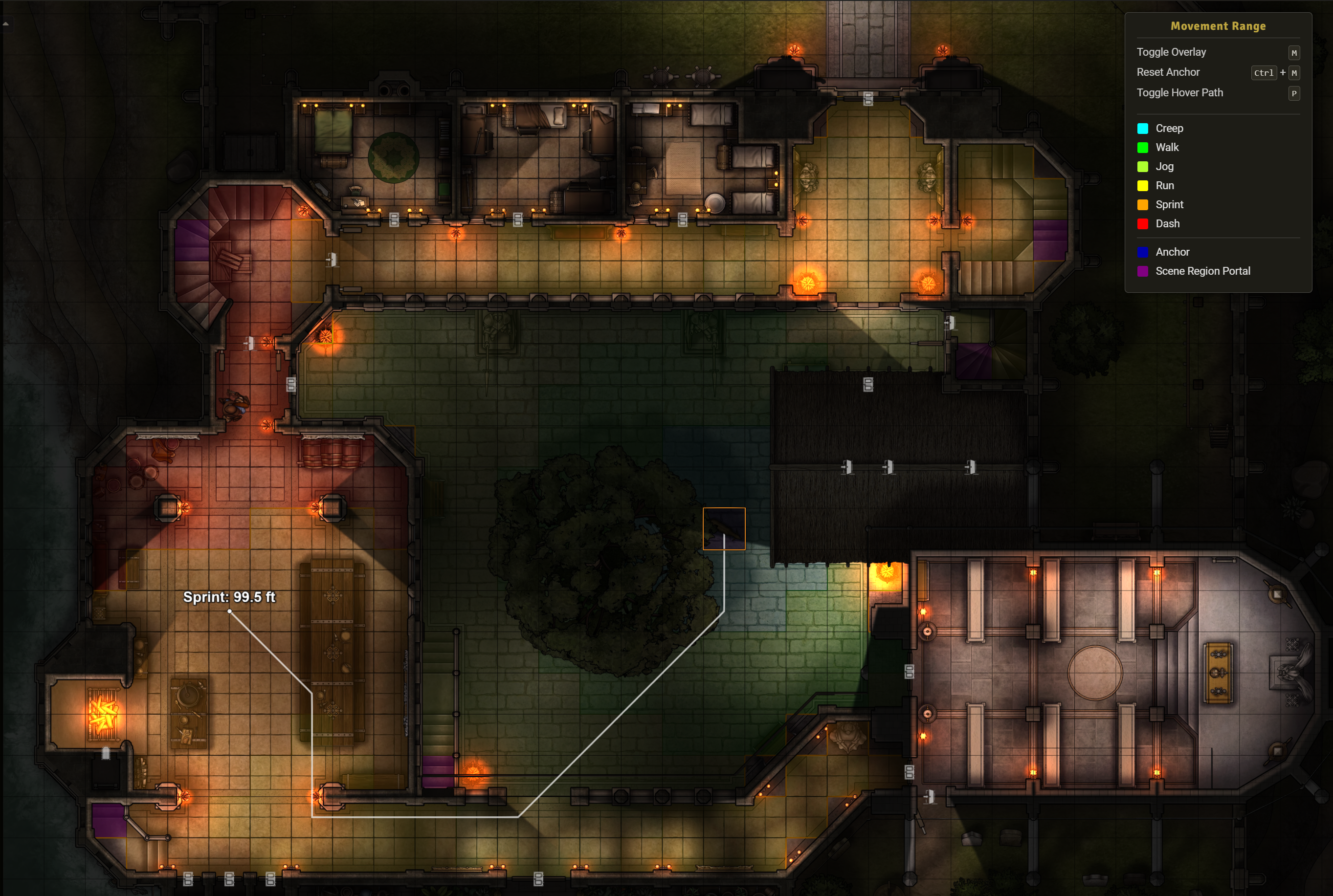
It highlights the movement area using colour-graduated cells based on RMU's movement paces (Walk, Run, Sprint, etc.) to help determine pace penalties when moving while acting.
Please install the correct version of the module:
- v1.x is compatible with v13 of FoundryVTT.
- v2.x is compatible with v14 of FoundryVTT.
Screenshot showing a GM view of a ground floor, multi-level scene
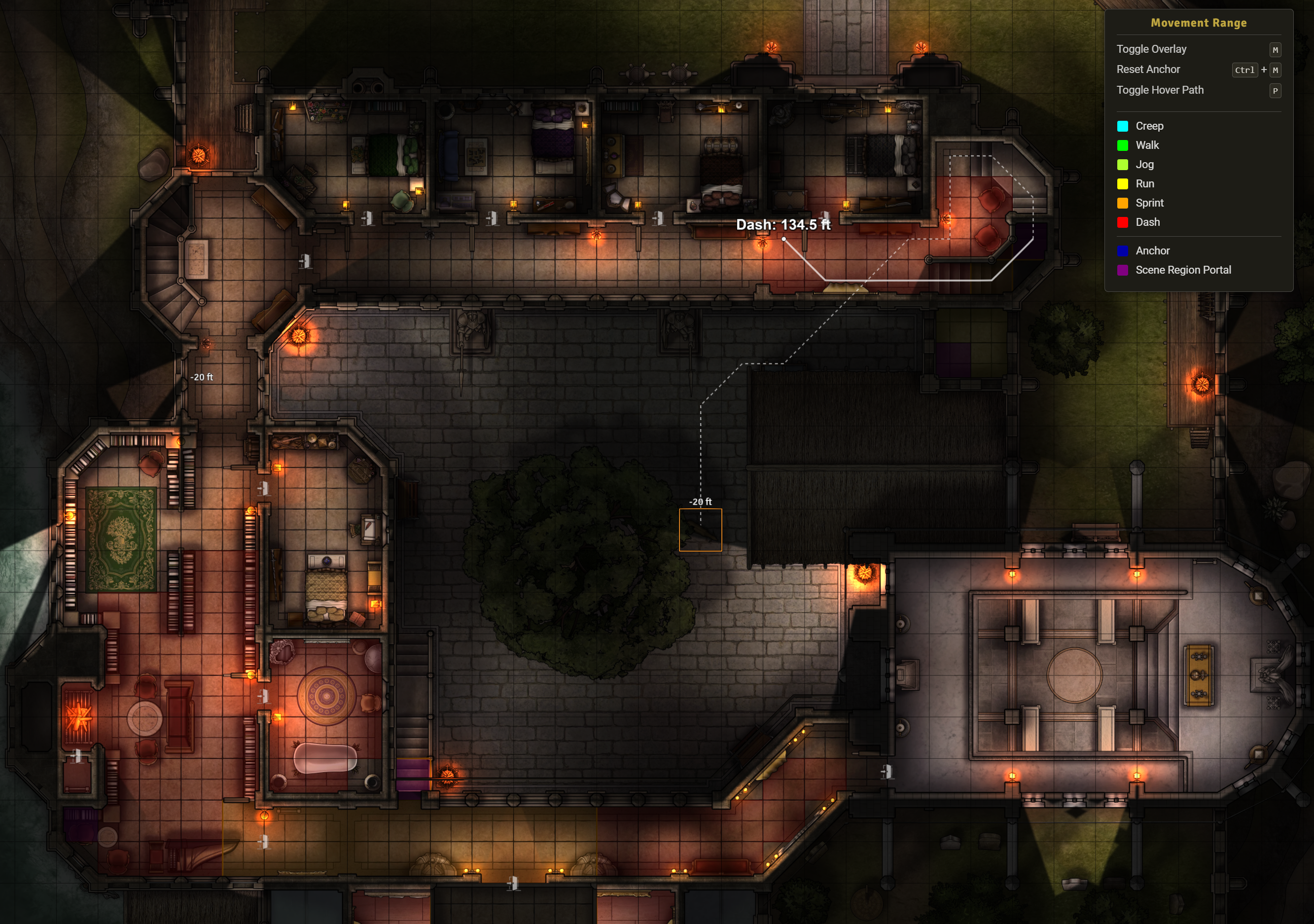
Screenshot showing a GM view of a first floor, multi-level scene tracing a path back to the token on the ground floor
Rolemaster Unified does not currently have official rules for grid-based movement. To stay as true to "Rules As Written" as possible, the module calculates the exact distance between grid centres and displays any remaining movement in the outermost grid squares.
Note 1: Movement tax: Because tokens must occasionally zig-zag to follow straight lines on Hex grids, you may notice a rough 15% "hex movement tax" loss of range on those maps. The tax on square grids is lower, and the tax on gridless is lower still (it still uses a micro-grid for part of the calculations when navigating around corners).
Note 2: Token size: The module does not take into account a token's size, leaving it to each table to decide their own rules for squeezing through tight spaces.
Note 3: Flight: The module's pathfinding engine evaluates 2.5D space to navigate stairs and portals, but it strictly calculates movement on the ground. It does not currently calculate 3D flight paths or aerial clearance limits. If a token flies or falls mid-air, movement ranges will lock to the ground elevation of the current level.
How it works
It features an "Anchor & Scout" system that allows players to move their token to "peek" around corners without losing track of their original movement starting point.
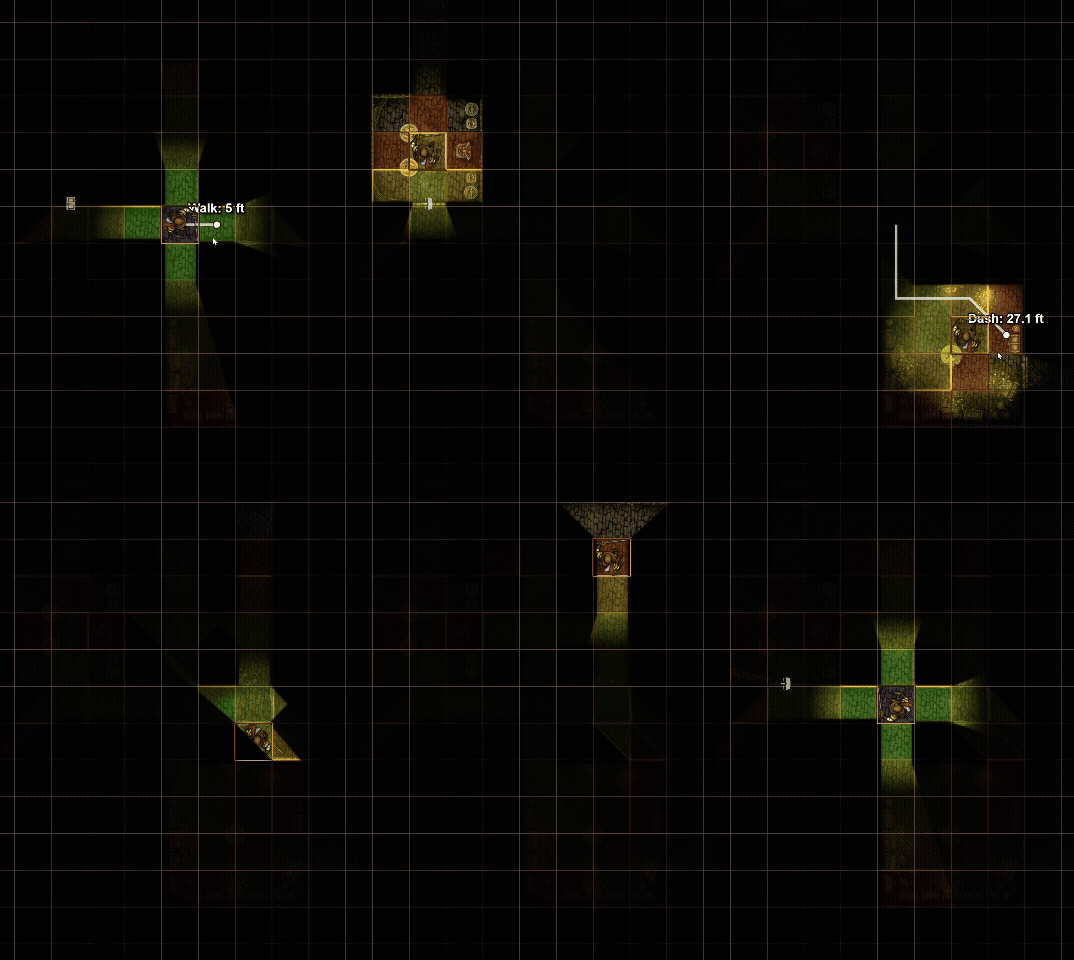
- Anchor & Scout Logic:
- The Anchor: When you first select a token, the module remembers where you started. The coloured grid always shows your movement budget from that starting point. The Anchor point remains until reset.
- The Scout: As you move your token, the overlay dynamically updates visibility. You can see into new rooms and corridors as if you were moving there, but the movement cost is always calculated from your Anchor.
- Cross-Floor Pathfinding: Paths will continue between levels if they are within range (including any elevation movement costs). If a level can be reached through multiple portals within movement range, it will show the paths from each portal on that level.
- For GMs, you can use the Token HUD to switch the token's view of levels and inspect the full extend of all paths from the current anchor point.
- For players, you can only see the path once your token has moved on the new level (no spoilers allowed!).
- Interactive Path & Distance Tooltip: Hovering your mouse anywhere inside the movement area will display the exact distance cost and pace required to reach it (e.g., "Walk: 15 ft"). It will also draw a trace back to the token to show exactly how the algorithm navigated around walls and corners to get there. For cross-floor movement, the interactive path uses a dashed line to show travel on previous floors and a solid line for the current floor. You can toggle the interactive path and distance tooltip on and off with a keybind (default
P).
- Gridless Path Finding: On gridless maps, the module uses a Theta* algorithm (using a synthetic micro-grid to improve performance) to draw Euclidean movement circles that wrap around corners and walls.
- Visual Paces & Action Limits: Displays distinct coloured overlays for different movement paces (
Creep, Walk, Jog, Run, Sprint, Dash). It automatically highlights the boundary of the 1 AP limit with a thicker border, helping players manage their action economy.
- Metric Support: Automatically detects if a scene is using metres and scales the underlying calculations to match RMU standards.
- Overlay Legend: A legend displays active keybinds and a breakdown of your configured pace, anchor, and portal colours when the overlay is active. The legend updates automatically if you modify your settings.
How to use it
- Toggle Visibility: Press
M (default hotkey) to toggle the overlay on or off.
- Create a new Anchor: Select a Token and press
Ctrl + M (default hotkey). This will "anchor" the token's starting position.
- Move: Move your token along the path you wish to take. The overlay will remain anchored to your starting point. You will reveal new areas as your token's vision moves or as doors open. Press
Ctrl + M again whenever you want to lock in a new anchor point.
- Show/Hide Interactive Path Tooltip: Press
P to toggle on/off a path tooltip that shows the route used to get to the point under your cursor.
Game settings
- Rounding Rules: (World Setting) Choose between "Permissive" (enter square if >0 movement remains), "Standard" (enter if >50% remains), or "Strict" (must have 100% cost available).
- Gridless Resolution: (Player Setting) Controls the visual resolution of the movement boundary on Gridless maps. Lower values create smoother shapes but require significantly more PC power and will take longer to calculate.
- Opacity: (Player Setting) Adjust how transparent the grid overlay is.
- Colour Palette: (Player Setting) Customise the colours for every pace (
Creep through Dash), plus the anchor square and any portal regions using the colour picker.
Important Notes
Visibility
To prevent this module from revealing parts of the map that players should not see, you must ensure your Scene is configured correctly:
- Scene Settings: "Token Vision" and "Fog of War" must be enabled.
- Token Settings: The player's token must have "Vision" enabled.
If these are disabled, the module may draw the movement grid in unexplored/hidden rooms.
Walls
The module uses a range of methods to work out if a path is valid. It is important that you set up your scene walls correctly to prevent "leaks" through gaps. This is particularly important when your scene has levels and those levels might be visible to each other. For example, if the first floor of a building has a gallery area overlooking the groundfloor courtyard, you will need to add walls around that gallery to show it is normally impassible. Of course, players may choose to jump over the balcony, but this shouldn't be treated as the normal path to descend to the ground!
License
This module is licensed under the MIT License.
Disclaimer and IP Notice
The Movement Range Finder for RMU module is an unofficial, community-developed tool designed to enhance the Rolemaster Unified experience on Foundry Virtual Tabletop.
This module is completely independent and is not affiliated with, endorsed, sponsored, or approved by Iron Crown Enterprises (ICE). "Rolemaster", "Rolemaster Unified", and the "RMU" acronym are trademarks of Iron Crown Enterprises.
This project does not distribute any proprietary text, artwork, or core rulebook content belonging to ICE. It functions strictly as a mechanical, workflow, and user interface enhancement for the official RMU system on Foundry VTT. Any use of specific system terminology or mechanical values is for functional compatibility purposes only.