Filroden's FoundryVTT Modules

All modules respect your chosen UI theme and offer two colour options:

Character Sheet Exporter for RMU

Latest Version Foundry Version License System Download Count Download Count Last Commit Issues

This is a simple module to create a printable version of a character or creature sheet. It also creates a copy of the raw actor data, which means exported character sheets become a useful way to transfer characters between people but still lets them re-import them into Foundry. E.g., if you create an adventure you want to share, you could include character sheets as part of the adventure and GMs could import them into Foundry using real Foundry data that the RMU system understands.

How to use

Open the Character, Creature or Loot actor sheet from a token on the scene (see note below). Click the "Export Sheet" button in the window header of the sheet.

Important: the actor must have a token on the scene as some information is not generated by the system for actors in the sidebar such as their attacks or spells and this is needed for a complete character sheet.

Window header of an actor sheet showing the Export Sheet button

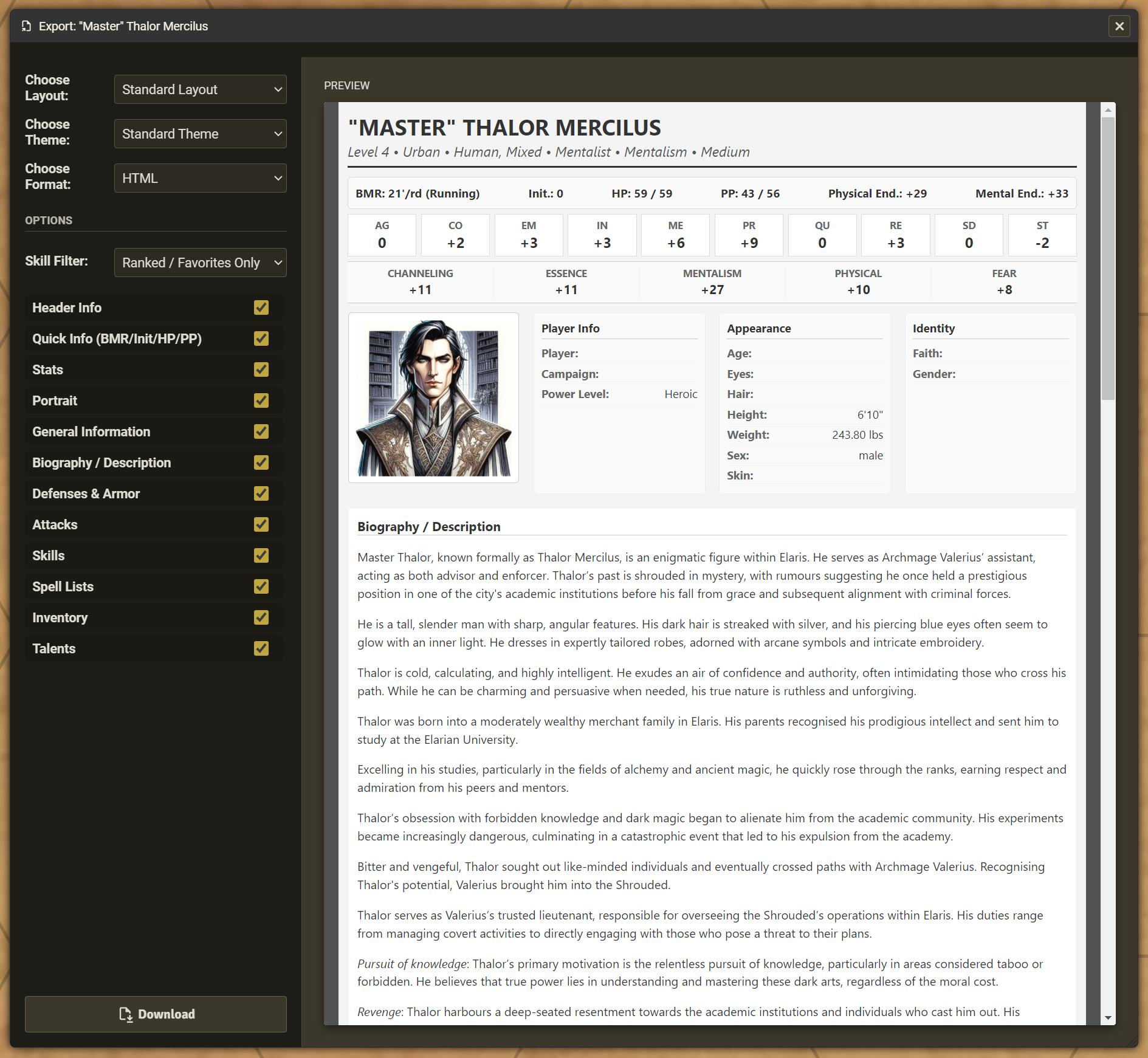
This will open a preview window, showing options on the left and a preview of the character sheet on the right.

Character Sheet Preview Window

Depending on the layout you select, you will be offered additional options:

  • Layout: The sheet layout design you would like to use.
  • Theme: The style of the sheet.
  • Output format: The output format: the module currently only offers one printable export format, HTML.
  • Skill filters: Choose if you want to show only ranked or favourite skills, or all skills
  • Section toggles: Toggle on or off each section in the sheet.

Once exported, open HTML files in your browser and use your browser's "Print" function (either to a printer or to create a PDF). Sheets are set up to (hopefully) avoid adding page breaks in the middle of sections/lists.

Portrait images are stored within the HTML file (technical information: encoded in Base64) so that the single HTML file contains everything you need to print or use remotely.

Localisation & Translation

The exported sheet combines text from three different sources. If you see English text in a translated sheet, it is likely due to one of the following:

  • The Sheet Layout (this module): Labels for sections (e.g., "Inventory", "Defenses", "Weight") are provided by this module. If these are in English, the module may need a translation update for your language.
  • Game Data (the RMU system): Rules data (e.g., skill names like "Acrobatics", stats like "Ag", or attack tables) are fetched directly from the Rolemaster Unified system. The module attempts to look up the translated name within the system's files. If the core RMU system has not translated a specific skill or item, it will fallback to English.
  • User Input (your data): Text that you or the GM have manually typed (e.g., specific item names, character background, or custom skill specialisations) is exported exactly as it appears on the sheet.

Character Capsule (from v1.4.0 and v1.5.0)

  • Embedded Raw Data: The exported HTML file now silently contains a copy of your character's Raw Foundry Data (JSON). Why? This turns your HTML export into a self-contained backup or a simple way to share your character with others so they can not only read the character sheet (the HTML) but also import it into Foundry.

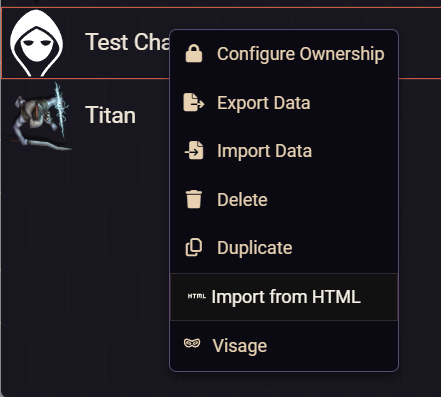
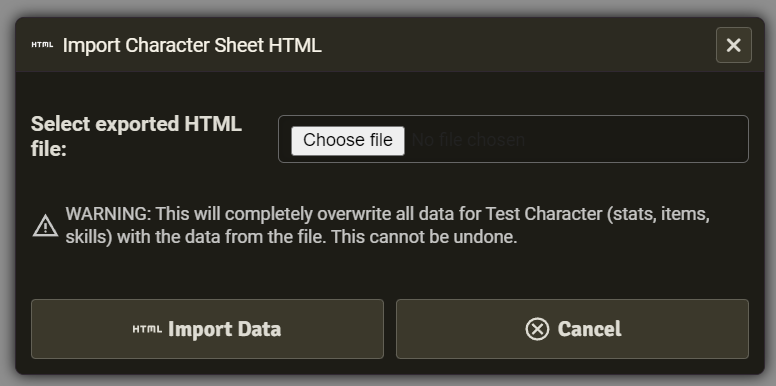
  • Import from HTML: You can re-import the embedded "character capsule" onto an existing actor you own from the sidebar using right-click context menu "Import from HTML". This will completely replace all information with the data stored in the capsule. I highly recommend creating a new actor and importing to that.

    Import from HTML menu option

    Import HTML sheet dialogue

  • Important Note on Editing: The HTML file is a visual display of the data, not the data itself. If you edit the text in the HTML file it will not change the embedded backup data. Think of it like a printed receipt: Scribbling a new price on a receipt changes what you see on the paper, but it doesn't change what the bank actually charged you. Any future "Import" feature will read the hidden, unedited data block, not the visible text you see on the screen.

Disclaimer and IP Notice

The Character Sheet Exporter for RMU module is an unofficial, community-developed tool designed to enhance the Rolemaster Unified experience on Foundry Virtual Tabletop.

This module is completely independent and is not affiliated with, endorsed, sponsored, or approved by Iron Crown Enterprises (ICE). "Rolemaster", "Rolemaster Unified", and the "RMU" acronym are trademarks of Iron Crown Enterprises.

This project does not distribute any proprietary text, artwork, or core rulebook content belonging to ICE. It functions strictly as a mechanical, workflow, and user interface enhancement for the official RMU system on Foundry VTT. Any use of specific system terminology or mechanical values is for functional compatibility purposes only.

Changelog
Version 1.7.4

BUG FIXES
- Restored missing system requirement in module.json.

Version 1.7.3

BUG FIXES
- Correctly prioritise the adjusted range of a weapon over its RAW value.

UNDER THE HOOD
- Updated weapon range data extraction to prioritise the RMU system's new usage data structure, ensuring continued compatibility with upcoming system updates.

Version 1.7.2

BUG FIXES
- Exclude the new "All Known Spells" list from being shown in the character sheet exporter.
- Minor code cleanup.

Version 1.7.1

UNDER THE HOOD
- Verified compatibility with Foundry V14 with minor code change.
- Bound the HTML character sheet directly to the iframe attribute so it survives V14 re-parenting if popped-out.

Version 1.7.0

NEW FEATURES
- FoundryVTT v14 Support: The module should be compatible with both v13 and v14 (no changes were needed up to v14.357).
- Extended Layout: Added new layouts for Character, Creature, and Loot sheets that include extended information: current XP, Conditions and Active Effects, equipment breakage stats, equipped/carried status, and additional spell attributes.
- Tournament Layout: Added new layouts for Character and Creature sheets that are based on the new Extended Layout but have "write in" space for information that will likely change during the game.
- Nested Inventory: Items stored inside containers are now indented on the exported sheets.
- New Theme - Rulebook: Added a new theme that takes inspiration from the RMU character and creature sheets.

IMPROVEMENTS
- Restored the Swedish translation file (sv.json) with a minor correction. Thank you Ralfsi for reading through the file.

UNDER THE HOOD
- Moved all data parsers (stats, attacks, skills, etc.) into separate files for easier maintenance and scaling.

Version 1.6.1

IMPROVEMENTS
- Rounded the value of weapon reach to two decimal places.
- Small improvements to French language support (thank you Olivier).

BUG FIXES
- Fixed missing localisations of Power Level and character sex attributes.

REMOVED
- Removed Swedish (sv) language support to comply with Foundry's AI Content Policy. If a native speaker can confirm the quality of the translation, it can be quickly restored.

Version 1.6.0

NEW FEATURES
- Loot Actor Exports: Added new layouts so you can export "Loot" actors which were introduced into RMU in v1.1.44 to support the Item Piles module integration.

UNDER THE HOOD
- Foundry ApplicationV2 Support: Upgraded the export button injection to natively support Foundry's modern AppV2 sheets.
- Scalable Architecture: Rebuilt the data-extraction pipeline with defensive parsing. The module is now highly resistant to missing data and future-proofed for any new actor types the system might introduce.

Version 1.5.1

BUG FIXES
- Fixed to prevent module trying to export a sheet for actor types other than characters or creatures.

Version 1.5.0

NEW FEATURES
- Added Movement Section: Added a more detailed movement section that shows the standard pace multipliers, AP costs for moving as an action and pace penalties for moving while acting.
- Added Import from HTML: You can re-import the embedded "character capsule" onto an existing actor you own from the sidebar (right-click context menu). This will completely replace all information with the data stored in the capsule.

IMPROVEMENTS
- New Spanish translations: New es.json file provided by community member, GusRPG. Thank you!

Version 1.4.0

NEW FEATURES
- Added Portraits Added the option to include the character's portrait. Technically, this converts the image into Base64 code and includes it in the output HTML file so will increase the file size of the HTML file by the size of the image plus ~30%.
- Added a General Information section A new section has been added that can include the general information about the character or creature (e.g., appearance, identity or biographical information).
- Granular Detail Toggles: Portrait, General Information (height, weight, age, etc) and Biography/Description (Long text) are now separate options. You can include the stats without printing pages of backstory.

UNDER THE HOOD
Character Capsule:
- Embedded Raw Data: The exported HTML file now silently contains a copy of your character's Raw Foundry Data (JSON). Why? This turns your HTML export into a self-contained backup. In a future update, I plan to allow re-importing characters directly from these HTML files.
- Important Note on Editing: The HTML file is a visual display of the data, not the data itself. If you edit the text in the HTML file it will not change the embedded backup data. Think of it like a printed receipt: Scribbling a new price on a receipt changes what you see on the paper, but it doesn't change what the bank actually charged you. Any future "Import" feature will read the hidden, unedited data block, not the visible text you see on the screen.

BUG FIXES
- Token Requirement: Added a warning if you try to export an actor that does not have a token on the current scene. (Foundry requires a token to exist to correctly calculate derived stats like Attacks and Spells).
- Fixed a missing css style bug that was causing some UI elements to appear transparent.

Version 1.3.0

IMPROVEMENTS
- Metric Support: Supports display of metric distances and weights.

Version 1.2.0

NEW FEATURES
- Fully customisable exports: You can now select your preferred layout and style separately, and turn each section on or off.

NEW LAYOUTS/STYLES:
- A printer-friendly style that uses less ink.
- A dark mode style.

BUG FIXES
- Fixed some missing localisation text in the layouts.

Version 1.1.1

BUG FIXES
- Fixed leaking css that was forcing the Foundry settings to always show in the sidebar.

Version 1.1.0

NEW FEATURES
- Creature Sheet support: You can now export creature sheets as well as character sheets.
- Export Preview: See the layout and style of the sheet export in a preview window before downloading.
- Multiple export layouts: You can now select from different export layouts.
- New Layout: Added a new Compact Layout designed to look like a stat block for including in adventures, and a Fun Layout for, well, fun!

IMPROVEMENTS
- Localisation: Added support for the exported character sheet to be localised using the current selected language set in FoundryVTT (if supported by both the RMU system and this module).
- Empty Skill Categories are now hidden when the sheet only shows ranked/favourite skills.

Version 1.0.0

IMPROVEMENTS
- Styled export dialogue.
- Replaced font awesome icons with Material Design Icons.

BUG FIXES
- Removed hardcoded "+" from resistance bonuses.

Version 1.0.0-beta1

INITIAL RELEASE Make sure to read the README.md first (I know you won't...you won't even be reading this).

Full screen preview